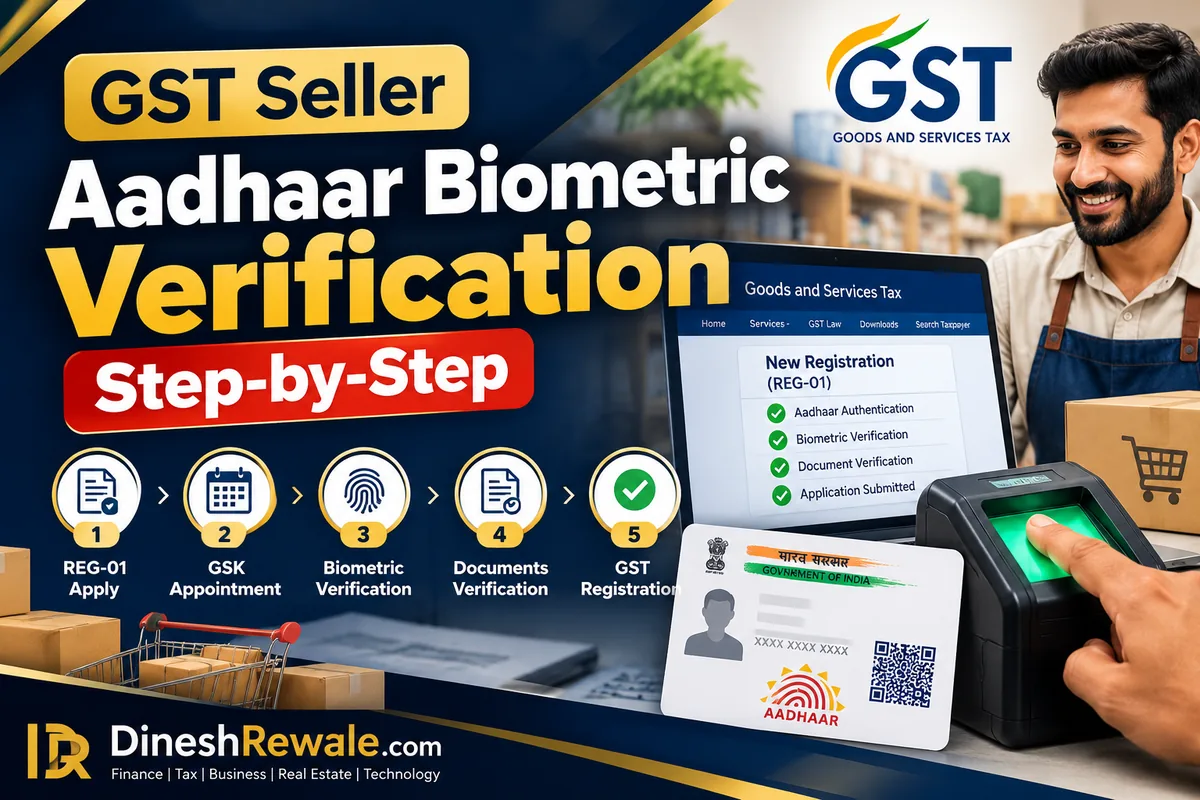
GST Seller Aadhaar Biometric Verification: 7 Steps
GST registration के लिए आवेदन करने के बाद अगर आपको Aadhaar biometric authentication या GST Suvidha Kendra (GSK) जाने का message मिला है, तो अगले steps समय पर पूरे करना ज़रूरी है। GST Seller Aadhaar Biometric Verification हर applicant के लिए mandatory नहीं है। GST Portal आपके application को data analysis और risk parameters के आधार पर identify कर सकता है। ऐसे case में applicant की biometric authentication, photograph और FORM GST REG-01 के साथ upload किए गए documents के originals verify किए जाते हैं।
GSTN की guidance के अनुसार, जब आपके application में यह verification required हो, तो intimation email में दिए गए instructions और deadline follow करें। आम तौर पर Part B submit करने के बाद लागू 15-day window के अंदर process पूरा करना जरूरी होता है। तय समय में आवश्यक steps पूरे नहीं हुए, तो ARN generate नहीं हो सकता।
Quick Answer: GST Aadhaar Biometric Verification कैसे करें?
- GST Portal पर FORM GST REG-01 भरें और application submit करें।
- Email/SMS में देखें कि OTP-based Aadhaar authentication चाहिए या biometric verification के लिए GSK visit करनी है।
- Biometric visit मांगी गई है, तो intimation email के link/details से appointment book करें।
- जिन promoters/partners और Primary Authorised Signatory (PAS) को बुलाया गया है, वे instructions के अनुसार जाएं।
- Uploaded documents के originals लेकर जाएं और deadline से पहले verification पूरा करें।
ध्यान दें: Portal ने GSK visit नहीं मांगी है, तो सिर्फ इस guide के कारण appointment book करने की जरूरत नहीं। अपने application में दिखाए गए current instructions ही follow करें।
GST Seller Aadhaar Biometric Verification क्या है?
यह GST registration process में identity और documents की in-person verification है। जिन applications को GST common portal risk parameters के आधार पर identify करता है, उनमें biometric-based Aadhaar authentication, applicant की photograph और registration application के साथ upload किए गए documents के originals की जांच हो सकती है। यह व्यवस्था CGST Rules, 2017 के Rule 8: Application for Registration के तहत आती है।
Biometric verification और OTP authentication एक जैसी चीज़ें नहीं हैं। OTP-based flow में Aadhaar से जुड़े registered contact details पर आने वाला OTP उपयोग हो सकता है। Biometric route में portal के निर्देशानुसार designated GST Suvidha Kendra पर जाना पड़ सकता है, जहां fingerprints/biometrics, photograph और applicable original documents की जांच होती है।
किन GST sellers को GSK जाना पड़ सकता है?
आमतौर पर, अगर आपने GST registration application में Aadhaar authentication चुना है और portal आपको data analysis तथा risk parameters के आधार पर biometric-based authentication के लिए identify करता है, तो GSK visit required हो सकती है। सभी sellers को biometric verification के लिए नहीं बुलाया जाता।
अगर आपने Aadhaar authentication नहीं चुना है, तब भी applicable process के अनुसार photo capture और original documents की verification के लिए designated GSK जाना पड़ सकता है। इसलिए केवल “Aadhaar authentication: Yes/No” देखकर यह अनुमान न लगाएं कि GSK visit बिल्कुल नहीं होगी। Portal से मिलने वाली intimation और current user guide निर्णायक हैं।
GST Portal की official Normal Taxpayer registration guide में OTP-based और biometric-based authentication के instructions दिए गए हैं।
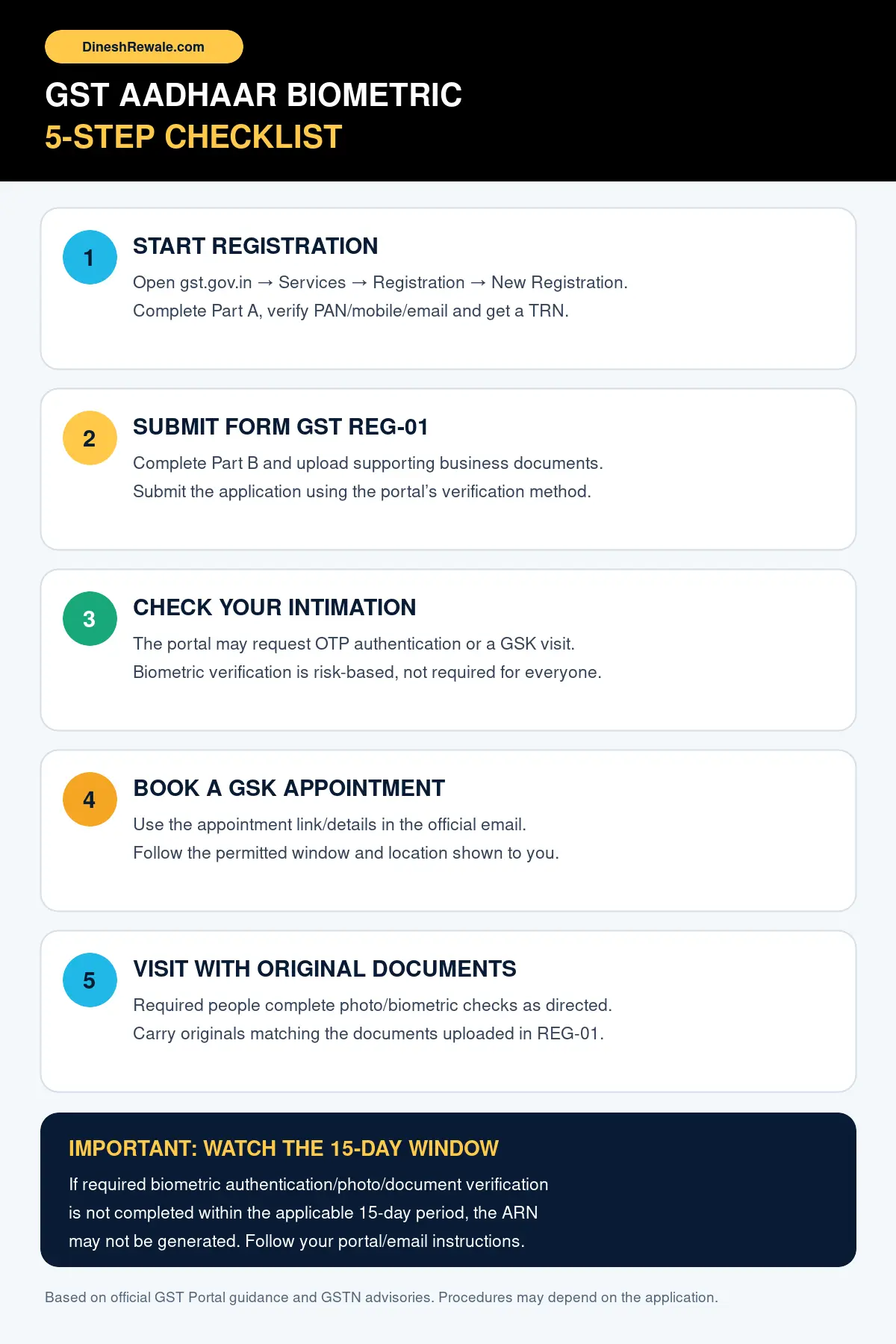
GST Aadhaar Biometric Verification: Step-by-Step Process
Step 1: GST Portal पर registration application शुरू करें
- GST Portal खोलें।
- Services → Registration → New Registration पर जाएं।
- Taxpayer type, State/UT, District, PAN के अनुसार legal business name, email और mobile number भरें।
- Email और mobile पर मिले OTP verify करें। इसके बाद Temporary Reference Number (TRN) generate होता है।
अगर आपके पास TRN पहले से है, तो New Registration में TRN वाला विकल्प चुनकर Part B तक जाएं।
Step 2: Part B में details और documents पूरा करें
TRN से login करें और FORM GST REG-01 का Part B पूरा करें। Business constitution, promoter/partner, authorised signatory, principal place of business, goods/services और अन्य applicable details ध्यान से भरें। Portal द्वारा मांगे गए supporting documents upload करके application submit करें।
Submit करने के बाद application से जुड़े contact details और email नियमित check करें। Registered email/mobile गलत होने या notice miss हो जाने से appointment और deadline प्रभावित हो सकते हैं।
Step 3: Email/SMS में verification का तरीका पहचानें
Application submit होने के बाद portal आपको applicable authentication route बताएगा। Instructions में OTP-based Aadhaar authentication link मिल सकता है या biometric authentication/document verification के लिए GSK visit और appointment booking की जानकारी मिल सकती है।
यदि biometric route दिख रहा है, तो email को केवल acknowledgement समझकर न छोड़ें। उसमें दिए गए designated centre, appointment procedure, required persons, documents और अंतिम तारीख को ध्यान से पढ़ें।
Step 4: GST Suvidha Kendra की appointment book करें
Intimation email में दिए गए official appointment link या portal flow का इस्तेमाल करें। उपलब्ध options में से applicable GSK और date/time चुनें। Appointment confirmation को email या phone पर सुरक्षित रखें। किसी अनजान agent को OTP, password या Aadhaar-related authentication details न दें।
किसी दूसरे centre पर सीधे पहुंचने से पहले यह confirm करें कि वह आपके application के लिए designated/allowed centre है। कुछ company structures में promoters/directors के लिए home-state GSK selection की सुविधा हो सकती है; अगर आपका portal वह option दिखाता है, तो उसी के अनुसार आगे बढ़ें।
Step 5: कौन GSK जाएगा, यह पहले confirm करें
किसी company या partnership application में हर व्यक्ति की भूमिका एक जैसी नहीं होती। GST Portal की guidance के मुताबिक promoters/partners को biometric authentication और photograph के लिए बुलाया जा सकता है, जबकि Primary Authorised Signatory (PAS) को uploaded documents के originals की verification करानी होती है। अगर promoter/partner और PAS एक ही व्यक्ति हैं, तो उसी व्यक्ति को लागू biometric/photo और document checks दोनों पूरे करने पड़ सकते हैं।
पहले किसी दूसरी GST registration में biometric verification पूरा कर चुके व्यक्ति के लिए कुछ मामलों में दोबारा biometric/photo की जगह केवल document verification आवश्यक हो सकती है। यह case-specific है। इसलिए अनुमान लगाने के बजाय application में चुने गए व्यक्तियों और GSTN के email instructions को follow करें। Maharashtra और अन्य राज्यों के लिए GSTN की official registration-process advisory में भी यह अंतर स्पष्ट किया गया है।
Step 6: Originals और appointment details लेकर जाएं
GSTN के निर्देशों के अनुसार, FORM GST REG-01 में upload किए गए documents की original copies verification के लिए मांगी जा सकती हैं। अपने intimation email में लिखी list को प्राथमिकता दें। आम तौर पर अपने साथ ये चीजें तैयार रखें:
- Appointment confirmation और GSTN/GSK का intimation email या उसका reference।
- Application में upload किए गए relevant documents के originals, जैसे principal place of business के ownership/rent/consent proof और applicable address proof।
- जिस applicant/promoter/partner/PAS को बुलाया गया है, उसके Aadhaar/PAN और identity details, जैसा official instructions में मांगा गया हो।
- Application/registration में दर्ज नाम और अन्य details से संबंधित supporting papers, यदि email में मांगे गए हों।
यह generic preparation list है, किसी एक application के लिए final document list नहीं। आपके email में जो specific documents मांगे गए हैं, वही final मानें। Uploaded document और original में नाम, address, date या business details का mismatch हो, तो visit से पहले उसे समझकर जरूरी supporting evidence साथ रखें।
Step 7: Verification पूरा कर application status देखें
GSK पर required biometric/photo checks और document verification कराएं। Visit के बाद GST Portal तथा registered email पर status और अगली कार्रवाई देखें। सिर्फ appointment book हो जाना process complete होने के बराबर नहीं है। जिन individuals की attendance या verification required है, उन सबकी प्रक्रिया complete होनी चाहिए।
Verification successful होने के बाद application आगे process हो सकता है। ARN (Application Reference Number) न दिखे, तो check करें कि कोई व्यक्ति visit से छूटा तो नहीं, document verification pending तो नहीं, या biometric authentication fail तो नहीं हुआ। Deadline पास है, तो GST Portal की official support facility से जल्द संपर्क करें।
15-day deadline: इसे क्यों miss नहीं करना चाहिए?
Rule 8 और GSTN advisories में application के लिए 15 दिन की समय सीमा का उल्लेख है। Biometric authentication और/या required photo/document verification, जैसा आपके case में लागू हो, निर्धारित अवधि में पूरा होना चाहिए। GSTN की advisory कहती है कि required promoter/partner या PAS यदि GSK visit नहीं करता, authentication fail रहता है या document verification समय-सीमा के अंदर complete नहीं होता, तो ARN generate नहीं होगा।
इसीलिए application Part B submit करने के बाद इंतजार न करें। अपनी intimation date, deadline और appointment confirmation देखें। यदि आपके email/portal पर कोई earlier date या अलग instruction दी गई है, तो उसे प्राथमिकता दें।
यह समय-सीमा सामान्य registration approval time की guarantee नहीं है। GSK verification complete हो जाने का अर्थ यह भी नहीं कि GSTIN उसी क्षण grant हो जाएगा। यदि officer को application में additional information चाहिए, तो अलग notice या verification process लागू हो सकती है।
अगर biometric verification में problem आए तो क्या करें?
- Aadhaar details match नहीं कर रहीं: नाम, date of birth या अन्य details में अंतर हो, तो पहचान संबंधी record जांचें। अनुमान से application details न बदलें; सही correction route और supporting proof confirm करें।
- Appointment email नहीं मिला: Spam/Junk folder जांचें और GST Portal पर application/TRN से status देखें। Official GST Helpdesk या portal पर दिए support route का उपयोग करें।
- एक promoter/partner नहीं जा सकता: बिना confirm किए यह न मानें कि PAS की visit अकेले पर्याप्त होगी। Application में selected persons और applicable verification requirements देखें।
- Documents incomplete हैं: Upload किए गए documents की copy और originals compare करें। जो अतिरिक्त evidence मांगा गया है, उसे deadline के भीतर arrange करने की कोशिश करें।
- Biometric authentication fail हो गया: Confirmation या next steps के लिए official GSK/portal instructions follow करें। ARN अपने आप generate हो जाएगा, ऐसा न मानें।
GST sellers के लिए तीन जरूरी सावधानियां
- केवल official links खोलें: GSK appointment का link GSTN/GST Portal की official intimation से लें। Unverified messages में अपना Aadhaar, OTP या GST login details दर्ज न करें।
- Application details सही भरें: Business address, PAN-linked legal name, promoter/partner और authorised signatory की जानकारी documents के अनुरूप होनी चाहिए।
- Submission proof संभालें: TRN, submitted application details, emails और appointment confirmation अपने records में रखें। इससे follow-up करते समय details ढूंढना आसान होता है।
GST registration से जुड़ी दूसरी स्थितियों के लिए ये guides भी उपयोगी हैं: small sellers के लिए simplified GST registration, GST Rule 14B और दूसरे State warehouse registration, एक PAN पर same State में multiple GSTIN, marketplace seller और अपनी website पर sales, और GST Council के registration और compliance updates।
Official video: Risk-based biometric Aadhaar authentication
CBIC India का यह explainer risk-based biometric Aadhaar authentication का आधार समझाता है। यह दिसंबर 2024 में प्रकाशित हुआ था, इसलिए इसे current appointment screen का exact walkthrough न मानें। अपनी application के लिए GST Portal की latest instructions और intimation email ही follow करें।
FAQs
1. क्या हर GST seller को Aadhaar biometric verification कराना होता है?
नहीं। Biometric-based authentication risk-based identification और application में लागू requirements पर निर्भर करता है। सभी applicants को biometric GSK visit के लिए नहीं बुलाया जाता।
2. GST biometric verification के लिए कितने दिन मिलते हैं?
GSTN advisories में required biometric/photo/document verification के लिए 15-day window बताई गई है। अपने application Part B की submission date और official intimation में दी अंतिम तारीख देखें, और उससे पहले process पूरा करें।
3. क्या GSK जाने के लिए appointment जरूरी है?
जब portal या intimation email appointment booking का निर्देश दे, तो उसी प्रक्रिया से slot book करें। अपने आप कोई भी centre चुनने से बचें; designated GSK और available slot की पुष्टि करें।
4. GSK पर कौन से documents ले जाने चाहिए?
FORM GST REG-01 के साथ upload किए गए relevant documents के originals और email में मांगे गए identity/appointment records लेकर जाएं। Exact list आपके application की intimation पर निर्भर करेगी।
5. अगर biometric verification नहीं होती तो ARN मिलेगा?
यदि आपके application में biometric authentication, photo capture या document verification required है और यह applicable deadline के भीतर complete नहीं होता, तो ARN generate नहीं हो सकता। Portal status और official support instructions देखें।
6. क्या biometric verification के बाद GSTIN तुरंत मिल जाता है?
नहीं। Verification complete होना registration workflow का एक जरूरी step हो सकता है, लेकिन final approval application scrutiny और बाकी applicable checks पर निर्भर करता है।
निष्कर्ष
GST Seller Aadhaar Biometric Verification में सबसे पहले यह समझें कि आपके application को वास्तव में कौन-सा route दिया गया है। अगर portal biometric verification के लिए GSK visit मांगता है, तो appointment book करें, सही promoters/partners और PAS की attendance confirm करें, uploaded documents के originals लेकर जाएं और applicable 15-day deadline से पहले प्रक्रिया पूरी करें। सही information और समय पर follow-up से avoidable delays कम करने में मदद मिल सकती है।
लेखक के बारे में
Dinesh Rewale भारतीय पाठकों के लिए business, tax, finance और technology से जुड़ी जटिल जानकारी को आसान भाषा, official references और practical examples के साथ समझाते हैं। Facebook पर Dinesh Rewale से जुड़ें।
Disclaimer: यह लेख सामान्य जानकारी और educational purpose के लिए है, व्यक्तिगत tax या legal advice नहीं। GST registration की प्रक्रिया, deadline और required documents आपके application, business structure तथा लागू rules/official notifications पर निर्भर करते हैं। आवेदन करने से पहले GST Portal की current instructions देखें; जरूरत पड़ने पर qualified GST professional से सलाह लें।