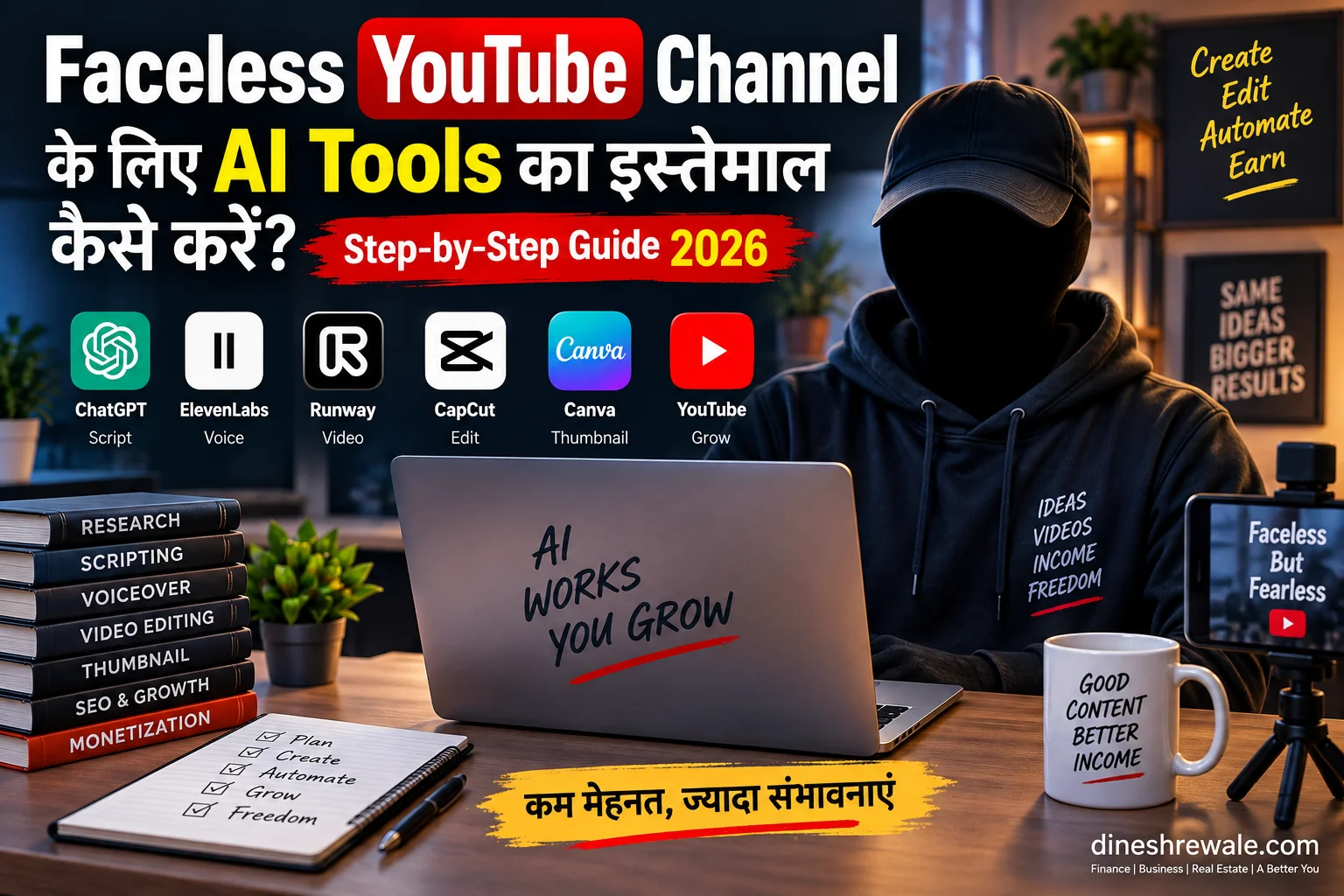
Faceless YouTube Channel: 7 Best AI Tools 2026 | Easy Guide
Faceless YouTube Channel शुरू करना अब पहले जितना कठिन नहीं है। Camera, studio और बड़ी production team के बिना भी आप research, script, voiceover, visuals और editing का बड़ा हिस्सा AI की मदद से तैयार कर सकते हैं। लेकिन यहीं एक जरूरी फर्क है: AI production को तेज करता है, originality को नहीं।
आज बहुत से creators एक ही गलती करते हैं। वे AI से script बनाते हैं, generic voice लगाते हैं, कुछ stock clips जोड़ते हैं और उसी template को बार-बार दोहराते हैं। शुरुआत में यह efficient लगता है, लेकिन long term में audience retention, trust और monetization तीनों पर असर पड़ सकता है। YouTube की current monetization policy repetitive या mass-produced low-value content के खिलाफ है।
इस guide में आप सीखेंगे कि Faceless YouTube Channel के लिए कौन-से AI tools practical हैं, किस काम के लिए कौन-सा tool चुनना चाहिए, एक efficient workflow कैसे बनता है, कितना समय बच सकता है और monetization के लिए किन risks से बचना चाहिए।
Quick Summary: सबसे जरूरी बातें
- AI को assistant की तरह use करें, content factory की तरह नहीं।
- Script, voice, video, editing और thumbnail के लिए अलग tools रखने से quality पर ज्यादा control मिल सकता है।
- Original research, commentary, examples और meaningful editing आपकी सबसे बड़ी ताकत हैं।
- 2026 में Veo 3.1 और Runway जैसे tools AI visuals को ज्यादा controllable बना रहे हैं।
Faceless YouTube Channel क्या होता है?
Faceless YouTube Channel ऐसा channel है जिसमें creator को हर video में अपना चेहरा दिखाना जरूरी नहीं होता। आप voiceover, screen recordings, charts, animation, stock footage और AI-generated visuals से video बना सकते हैं।
Finance explainers, business case studies, software tutorials, real-estate education और data-driven documentaries इस format के लिए खास तौर पर उपयुक्त हो सकते हैं। लेकिन “faceless” का मतलब “hands-free” नहीं है। Research, fact-checking, story structure और final quality की जिम्मेदारी आपकी ही रहती है।
2026 में Faceless YouTube Channel के लिए AI क्यों उपयोगी है?
सबसे बड़ा फायदा time efficiency है। एक solo creator पहले जहां अलग-अलग production stages में कई घंटे खर्च करता था, वहीं AI repetitive काम कम कर सकता है। सही use case में आप idea research, outline, narration, captions और basic editing जल्दी कर सकते हैं।
Expert Insight: आपका KPI सिर्फ “कितने videos बनाए” नहीं होना चाहिए। ज्यादा उपयोगी metric है: एक घंटे में कितनी अच्छी viewer value तैयार हुई?
Faceless YouTube Channel के लिए 7 Best AI Tools
1. ChatGPT: Research, Script और Hooks
ChatGPT को ideas, outlines, hooks, FAQs और first-draft scripts के लिए use करें। सबसे अच्छा परिणाम तब मिलेगा जब prompt में audience, goal, evidence और tone साफ लिखेंगे। Final script में अपनी भाषा, examples और verified facts जोड़ें।
AI से Hindi content बनाने के broader workflow के लिए हमारा AI से Hindi Content बनाकर Blog कैसे शुरू करें? guide उपयोगी reference है।
2. Google Veo 3.1 + Flow: AI Video और B-Roll
Veo 3.1 image-to-video, vertical video और cinematic generation workflows के लिए useful है। जब किसी concept को normal B-roll से दिखाना मुश्किल हो, तब आप AI video generator का इस्तेमाल कर सकते हैं।
उदाहरण के लिए future city, abstract financial concept या fictional business scene को visualise करने में यह मदद कर सकता है। फिर भी हर sentence के लिए AI clip बनाने की जरूरत नहीं है।
3. Runway: Consistent Visual Storytelling
Runway उन videos में ज्यादा उपयोगी हो सकता है जहां character, location या object continuity जरूरी है। Story-driven explainers और documentary-style visuals में consistency production quality को मजबूत कर सकती है।
4. ElevenLabs: Hindi/Hinglish AI Voiceover
Voiceover-heavy Faceless YouTube Channel के लिए narration quality बहुत महत्वपूर्ण है। AI voice चुनते समय natural delivery से ज्यादा ध्यान pronunciation, pauses और emphasis पर दें। Finance video में ₹10 lakh, 7.25%, CAGR या company names का गलत उच्चारण trust कम कर सकता है।
5. CapCut: Fast Editing और Captions
CapCut beginners के लिए editing, captions, AI voice और fast repurposing में practical है। Shorts से long-form तक एक lightweight workflow बनाया जा सकता है।
6. Canva: Thumbnails और Graphics
Canva thumbnails, charts, title cards और supporting visuals के लिए काम आता है। Magic Media short AI visuals भी दे सकता है, लेकिन thumbnail design में clarity और contrast को flashy effects से ऊपर रखें।
7. vidIQ: YouTube SEO और Content Planning
vidIQ AI Coach ideas, audits, title feedback और content planning में मदद कर सकता है। इसका सबसे अच्छा उपयोग analytics को समझने के लिए है, न कि हर video का पूरा creative process automate करने के लिए।
Faceless YouTube Channel के लिए सही AI Workflow
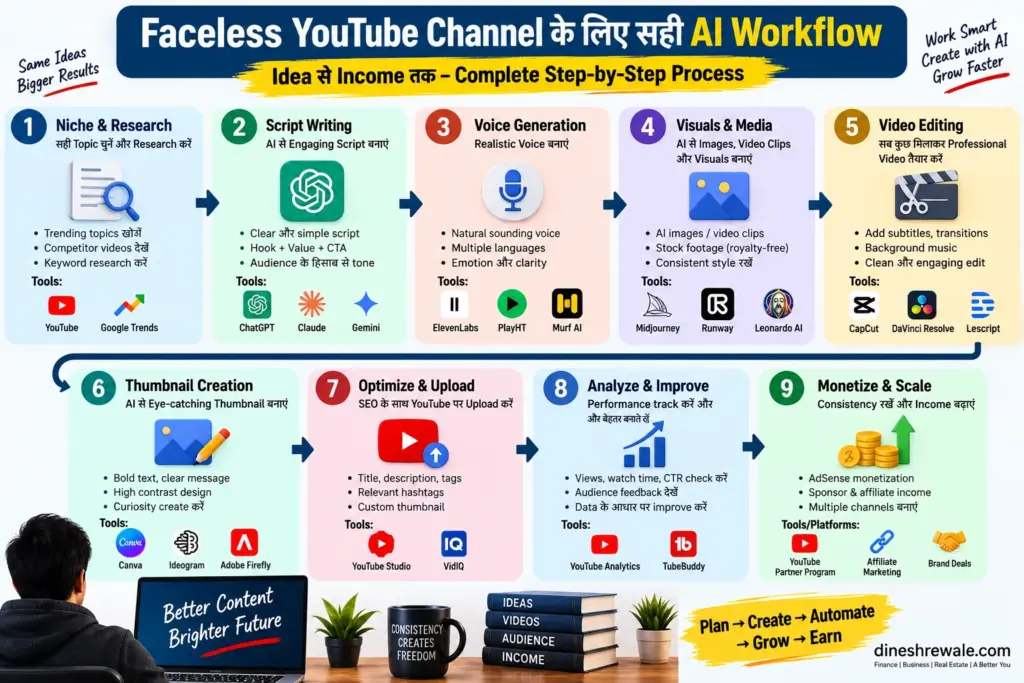
Step 1: Topic चुनें, सिर्फ keyword नहीं
“Personal finance” एक category है, topic नहीं। बेहतर topic वह है जिसमें viewer की समस्या साफ दिखती हो, जैसे “₹50 लाख home loan में prepayment से कितना interest बच सकता है?” इसी तरह faceless YouTube channel ideas चुनते समय search demand के साथ audience pain point भी देखें।
Step 2: Research Map बनाएं
AI से subtopics, objections और FAQs निकालें। इसके बाद important claims को primary sources से verify करें। Finance content में RBI की official website और SEBI की official website जैसे sources को प्राथमिकता दें।
Step 3: Script को अपने angle से rewrite करें
AI draft को final article या script की तरह publish न करें। उसमें अपने examples, comparisons, commentary और practical takeaways जोड़ें। एक strong structure हो सकता है: Hook → Problem → Evidence → Example → Explanation → Mistake → Action Plan।
Step 4: Voiceover तैयार करें
Voice calm और conversational रखें। हर paragraph को एक ही speed पर पढ़ने से narration robotic लग सकती है। Numbers और technical terms पहले test करें।
Step 5: Visual Storyboard बनाएं
एक practical mix रख सकते हैं: screen recordings, charts, stock/B-roll, selective AI visuals और text animation। Exact ratio कोई fixed rule नहीं है। नियम इतना है कि हर visual narration को समझने में मदद करे।
Step 6: Edit for Retention
Silence, filler words, repeated lines और weak openings हटाएं। Captions readability को support करें, narration को cover न करें। Video की पहली 30-60 seconds को खास attention दें।
Step 7: Thumbnail और Title
Thumbnail एक clear idea communicate करे। Title curiosity पैदा कर सकता है, लेकिन misleading नहीं होना चाहिए। CTR बढ़ाने के लिए promise करें, bait नहीं।
Step 8: Analytics से next video तय करें
CTR, average view duration, audience retention, traffic sources और returning viewers देखें। कोई video कमजोर हो तो topic, thumbnail और opening तीनों अलग-अलग evaluate करें।
Realistic AI Time-Saving Calculation
मान लीजिए आप हर महीने 12 long-form videos बनाते हैं। Manual workflow में एक video पर 4 घंटे और AI-assisted workflow में 1.75 घंटे लगते हैं।
| Metric | Manual | AI-Assisted |
|---|---|---|
| Videos/month | 12 | 12 |
| Hours/video | 4 | 1.75 |
| Total hours | 48 | 21 |
| Time saved | — | 27 hours |
अगर आपकी working-time value उदाहरण के लिए ₹250/hour है, तो 27 × ₹250 = ₹6,750 की theoretical time value बनती है। यह income guarantee नहीं है। इसका मतलब सिर्फ यह है कि बचा हुआ time आप ज्यादा research, बेहतर storytelling और distribution में लगा सकते हैं।
क्या AI-generated Faceless YouTube Channel monetize हो सकता है?
हाँ, लेकिन AI इस्तेमाल करना monetization की guarantee नहीं है। YouTube की current policy repetitive या mass-produced content को inauthentic मान सकती है। इसलिए एक ही template, वही voice, वही visuals और सिर्फ topic बदलकर bulk videos बनाना risky approach है।
आपका channel ज्यादा मजबूत होता है जब आप original research, meaningful commentary, examples, editing और topic-specific visuals जोड़ते हैं। AI को production layer रखें, editorial identity नहीं।
YouTube पर AI Content Disclosure क्यों समझना चाहिए?
Realistic synthetic या meaningfully altered media के लिए YouTube के upload workflow में disclosure options मौजूद हैं। Practical rule यह है कि जब AI किसी realistic person, event या scene को इस तरह बदलता है कि viewer की perception प्रभावित हो सकती है, तब disclosure requirements को check करें।
Faceless YouTube Channel के Pros, Cons और Hidden Risks
Pros
- Camera और studio setup की जरूरत कम।
- Solo creator कई production stages संभाल सकता है।
- AI से research और editing का repetitive काम तेज हो सकता है।
- Hindi, Hinglish और multilingual content scale करना आसान हो सकता है।
Cons और Risks
- Repetitive content risk: template-based videos जल्दी interchangeable लग सकते हैं।
- Copyright risk: music, footage, voices और fonts के commercial rights अलग हो सकते हैं।
- Hallucination risk: AI confident tone में गलत fact दे सकता है। Finance topics में हर महत्वपूर्ण claim verify करें।
- Voice-cloning risk: किसी दूसरे व्यक्ति की voice use करने से पहले consent और licensing समझें।
- Tool dependency: scripts, raw assets और project files अपने control में रखें।
2026 में Monetization Threshold को कैसे देखें?
वर्तमान YPP ad-revenue eligibility के लिए सामान्य threshold 1,000 subscribers + 4,000 qualified public watch hours in the last 12 months, या 1,000 subscribers + 10 million qualified public Shorts views in the last 90 days है। Expanded YPP कुछ eligible creators को lower thresholds पर fan-funding features तक पहुंच देता है। YouTube ने नए creators के लिए 2027 से future threshold changes की भी घोषणा की है, इसलिए long-term strategy केवल आज की eligibility पर आधारित न रखें।
किस तरह के Faceless YouTube Channel Ideas चुनें?
ऐसे topics चुनें जिनमें information value हो। उदाहरण के लिए:
- Finance explainers: SIP, budgeting, insurance और home-loan concepts.
- Business breakdowns: business models, unit economics और company case studies.
- Real-estate education: buying mistakes, rent vs buy और loan basics.
- Software tutorials: screen recording + narration + practical demo.
- Data-driven documentaries: market history, industry trends और company stories.
AI से income-oriented ideas के लिए हमारा AI Tools से पैसे कैसे कमाएं? वाला article भी पढ़ सकते हैं।
आज से शुरू करने का Step-by-Step Action Plan
- एक niche चुनें: ऐसा topic area जहां आप 6 महीनों तक useful videos बना सकें।
- 20 video ideas लिखें: हर idea में problem और expected outcome जोड़ें।
- एक script framework बनाएं: Hook, evidence, example, takeaway और CTA.
- Starter stack बनाएं: ChatGPT + ElevenLabs + CapCut + Canva. जरूरत बढ़ने पर Veo, Runway और vidIQ जोड़ें।
- पहले 5-10 videos manually review करें: voice, facts, visuals और originality check करें।
- Thumbnail system बनाएं: consistent typography और recognizable layout रखें।
- Analytics review करें: हर batch के बाद retention और CTR patterns देखें।
- Automation धीरे बढ़ाएं: quality standard stable होने के बाद ही repetitive tasks automate करें।
FAQs: Faceless YouTube Channel
क्या Face दिखाए बिना YouTube monetize हो सकता है?
हाँ। Face दिखाना requirement नहीं है। Content की originality, value और current YPP policies का पालन अधिक महत्वपूर्ण है।
क्या AI से बना पूरा video monetize हो सकता है?
AI use अपने आप disqualifying नहीं है। समस्या repetitive, mass-produced या low-value content में हो सकती है।
Hindi Faceless YouTube Channel शुरू करना सही है?
हाँ। Finance, business, real estate, education और software explainers में Hindi/Hinglish audience के लिए opportunities हो सकती हैं।
कौन-सा AI tool सबसे पहले लेना चाहिए?
Beginner के लिए script, voice और editing tools सबसे practical starting point हैं। Advanced visuals की जरूरत बाद में पहचानें।
क्या AI voice इस्तेमाल करते समय सावधानी चाहिए?
हाँ। Licensed voices use करें और किसी दूसरे व्यक्ति की voice cloning से पहले consent तथा commercial rights समझें।
क्या 30-40 videos की automation तुरंत शुरू करनी चाहिए?
नहीं। पहले 5-10 videos से quality baseline बनाएं। फिर automation को धीरे-धीरे scale करें।
Final Words
Faceless YouTube Channel शुरू करना 2026 में पहले से आसान है, लेकिन सफल channel बनाना अभी भी creator judgment पर निर्भर है। AI आपको production तेज करने, costs control करने और एक solo workflow बनाने में मदद कर सकता है। लेकिन audience को रोककर रखने वाली चीज सिर्फ AI नहीं है। वह है useful information, strong storytelling, verified facts और आपका unique point of view।
हर video publish करने से पहले एक सवाल पूछें: “क्या viewer को इस video में ऐसी value मिल रही है जो वह किसी generic AI-generated video में आसानी से नहीं पा सकता?” अगर जवाब हाँ है, तो आपका AI workflow सही दिशा में है।
Disclaimer
यह लेख educational और informational purpose के लिए है। AI tools, YouTube policies, pricing, features और licensing terms समय के साथ बदल सकते हैं। किसी paid tool को खरीदने या commercial use से पहले उसकी current terms verify करें। YouTube monetization eligibility platform review और current policies पर निर्भर करती है; कोई tool या workflow income या monetization की guarantee नहीं देता।
Official Research Sources
YouTube Monetization Policies · YPP Eligibility · AI Content Disclosure · Google Veo 3.1 · Runway Gen-4 · ElevenLabs · CapCut
Related Posts